The Office: Somehow We Manage
- 3.4
- Rating
- 1.00M
- Installs
- Free
- Price

 Analysis by App-foxy
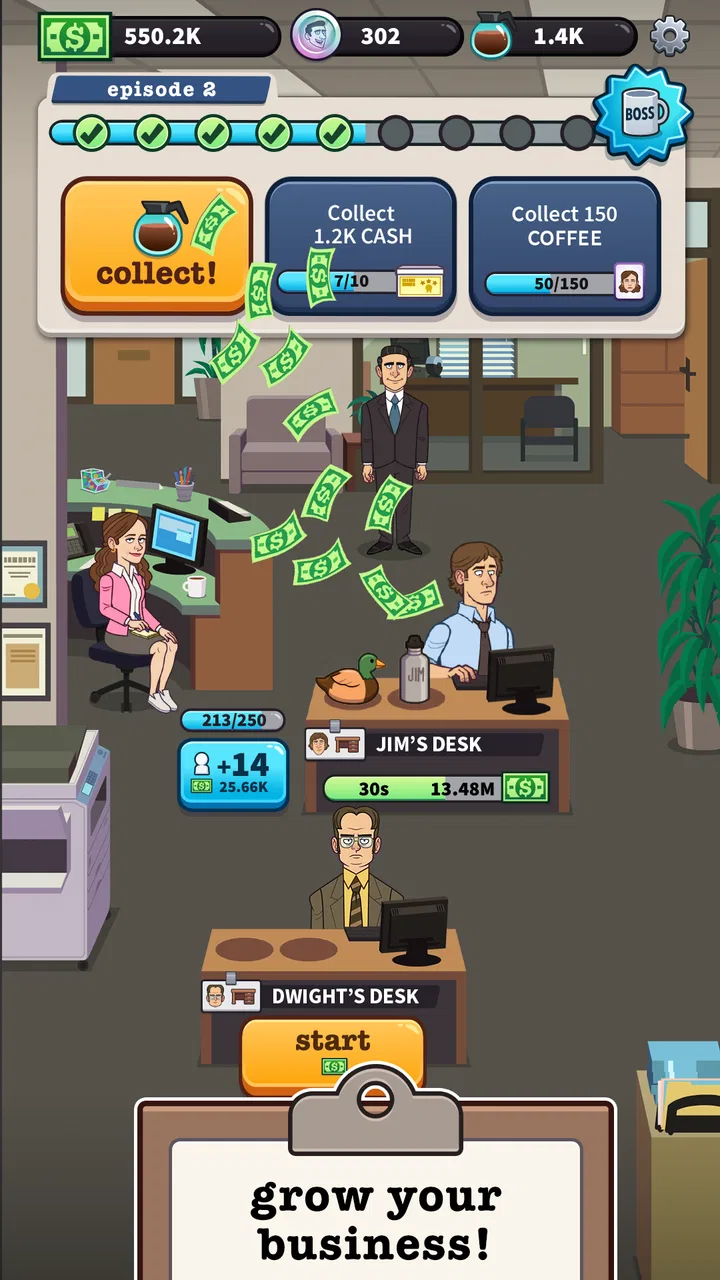
I approached The Office: Somehow We Manage as a light simulation game rather than a traditional strategy title. Its idea is simple: help Michael Scott and the Dunder Mifflin Scranton team generate in-game cash while the office keeps moving through an idle-style loop. That setup makes it easy to understand within minutes, but the real question is whether the familiar characters add enough personality to keep the routine enjoyable after the novelty fades.
My short answer is that it works best as a relaxed, occasional game for fans of The Office. I can open it during a spare moment, make a few decisions, collect progress, and leave without needing a long uninterrupted session. It is free to start, rated Teen, and has attracted more than a million installs, so it clearly has an audience beyond the most dedicated viewers. Still, the 3.4 average from around 26 thousand ratings suggests a mixed experience, and that feels fair: the license gives the game charm, while the idle structure can become repetitive.
How the office loop feels in everyday play
The first thing I noticed is how little pressure the game puts on me. This is not a fast reflex challenge, and it does not ask me to master complicated controls. Instead, I guide an office-themed progression built around earning cash and improving the operation. The appeal comes from watching a familiar workplace turn into a small management project, with Michael Scott and the Scranton cast providing the humor and context.
You May Also Like

 Blood Strike: 2.5 Anniversary
Blood Strike’s Loadouts Turn Every Drop Into a Tactical Gamble
A close look at Blood Strike’s custom loadouts: how fast access to signature weapons reshapes its battle royale rhythm, rewards preparation, and narrows the gap between fights.

 Pandora - Music & Podcasts
Pandora’s Music Is Easy to Start, but Harder to Recover
Pandora’s strength is its low-effort path from a seed to a station. Its weak spot is how much confidence it asks you to place in connection, setup, and quiet recovery.

 8 Ball Pool
 Is Built on Rivalries, Rematches, and Routine
A close look at the rivalries, rematches, shared routines, and unanswered safety questions that turn a quick pool match into a persistent mobile community.

 Samsung Music
’s Quiet Strength Is Playing What You Already Own
Its reach comes less from spectacle than from dependable access to a personal library. That simplicity is both the app’s strongest retention engine and its ceiling.

 AccuWeather: Weather Radar
AccuWeather Review: A Quick, Clear Forecast for Everyday Decisions
For everyday plans, the best forecast is the one you can understand quickly. AccuWeather makes rain timing, radar, and local conditions easy to act on, with a few trade-offs.

 Hill Climb Racing
Why Hill Climb Racing Still Turns Crashes Into One More Run
A tiny car, a bumpy hill and one more upgrade: Hill Climb Racing keeps resurfacing because its simple chaos makes every near-miss feel personal.
More From Our News Desk



That makes it a good fit for short visits. A realistic use case is checking in while waiting for a train, collecting what has accumulated, making one or two upgrades, and closing the game again. I do not need to remember a complex battle plan or protect a long competitive streak. The design is comfortable for players who like visible progress but do not want a demanding daily obligation.
The trade-off is that idle games depend heavily on pacing. When progress arrives at a satisfying rhythm, even a simple loop can feel rewarding. When improvements begin to feel too distant, the same loop can seem like tapping through chores. In this game, the Office setting helps soften that repetition, but it cannot remove it entirely. Fans may enjoy seeing the familiar workplace framing; players who want deep simulation systems may find the management layer too light.
What makes the theme matter
The license is not just decoration. Michael Scott and the Dunder Mifflin setting give ordinary income-building actions a recognizable personality. That changes the mood compared with a generic idle business game, where numbers and upgrades may be the only reason to continue. Here, the workplace comedy atmosphere is the main emotional hook.
In my experience, this also affects who will enjoy the game most. Someone who knows the show can attach meaning to the office references and character-driven presentation, even during a repetitive session. Someone unfamiliar with the series may still understand the objective, but may not feel the same reason to return. The game is therefore more approachable than many licensed titles, yet its strongest advantage is naturally tied to the source material.
I also think the theme makes it better suited to casual play than to intense optimization. I can treat it as a small visit to a fictional office rather than a serious business simulator. That is useful when I want something gentle, but it also means I would not choose it over a deeper management game if I wanted detailed staffing, production chains, or long-term planning.
Where speed expectations should be realistic
Because this is an idle simulation, “fast” does not mean rapid action. The meaningful progress is designed to build over time, so opening the game repeatedly will not transform it into an arcade experience. I judge its pace by how quickly I can understand the next useful decision, not by how many actions I can perform in a minute.
That distinction matters before downloading. If I want a game that delivers immediate excitement, this is probably the wrong choice. If I want a low-effort progress loop that I can revisit between other activities, its slower rhythm makes more sense. The office theme gives the waiting and collecting a bit of flavor, but the underlying appeal remains gradual advancement.
My practical advice is to avoid treating every return as a demand to maximize income. I get more enjoyment when I check in with a small goal, such as improving the part of the office that currently feels most limiting, rather than trying to push every system at once. That approach makes the pace feel more manageable and reduces the sense that I am simply repeating the same collection routine.
What happens during heavier sessions
The most demanding moments are likely to come from extended play rather than from complex controls. An idle game can encourage repeated collection, upgrade decisions, and menu movement, especially when I am trying to make the most of a productive stretch. Those sessions reveal whether the interface remains comfortable and whether the game still feels clear after many small actions.
I prefer to play in short cycles. I collect progress, inspect the next improvement, make a focused change, and then leave the game alone for a while. This workflow suits the design and prevents the experience from turning into a long session of watching numbers rise. It also gives me a better sense of whether the next upgrade genuinely changes my progress or merely increases a value on screen.
A useful trade-off appears here: longer sessions may feel productive, but they can also expose the limits of the idle format. The more time I spend actively pressing through the same loop, the more I notice repetition. Short check-ins preserve the novelty of the characters and office setting. Players who expect a continuously engaging management challenge may be disappointed if they stay too long at once.
There is another consideration for families. The game carries a Teen content rating, so I would not assume it is aimed at young children simply because the presentation is colorful and familiar. A parent choosing it for a younger player should pay attention to the rating and to the presence of optional purchases. The game is free to begin, but individual in-game purchase options range from $0.99 to $99.99, which makes device-level spending controls sensible.
Managing progress without turning it into spending
The free entry point is helpful because I can test whether the loop suits me before paying anything. I would recommend doing exactly that. Play long enough to see whether the office theme and gradual progression hold my attention, rather than assuming that a recognizable license automatically makes the game a good fit.
The purchase range also changes how I approach upgrades. I would not spend simply because a timer or progression step feels slow. First, I would decide whether the improvement affects the part of the office I actually use most. If the game is becoming a daily habit, setting a personal limit before buying anything is more sensible than making several small impulse decisions.
This is one of the clearest differences between the game and a premium simulation with a single upfront cost. Here, I can start without paying, but the ongoing structure may make optional spending more visible during play. Players who dislike in-app purchases entirely may prefer a paid alternative, even if it lacks The Office connection. Fans who value the setting can reasonably try the free version first and judge the balance personally.
Reliability and recovering from interruptions
For an idle game, reliability is especially important because the whole promise depends on returning to accumulated progress. I expect the experience to be most useful when I can leave it, come back later, and quickly understand what has changed. That recovery flow is more important to me than constant active play.
I also treat interruptions realistically. Mobile games can be closed by the operating system, paused when a call arrives, or reopened after a long gap. My preferred routine is to finish a clear action before switching away, then check the game again rather than leaving an unfinished decision on screen. This is not a complicated technique, but it keeps the experience orderly and makes the idle format work in everyday conditions.
The current version is 1.46.1, and the developer is East Side Games Studio. Those details matter when checking compatibility or identifying the correct release, particularly if I am troubleshooting an issue after an update. I would keep the game updated through the normal platform channel and restart it if a session behaves strangely, rather than repeatedly tapping through a screen that appears stuck.
I would not choose this game for a situation where uninterrupted reliability is critical, such as a long trip with no chance to troubleshoot. Idle progress is enjoyable when it feels dependable, but the format has less value if I cannot comfortably return to the same state. For normal casual play, the sensible expectation is to use it as a flexible side activity, not as the only game on a device.
Device constraints and practical expectations
The minimum operating system is Android 7.0, which makes the compatibility requirement relatively approachable for older Android devices that still meet that baseline. That does not guarantee identical performance on every phone or tablet, however. Hardware age, available storage, background activity, and the number of other apps running can all affect how comfortable a game feels.
I would install it on a device with enough free space and close demanding apps before judging its responsiveness. This is particularly useful when the game has been open for a while or when I am moving between several applications. A clean restart can also distinguish a temporary device slowdown from a problem with the game itself.
For an older phone, I would keep sessions brief and avoid judging the game during a moment when the device is already hot or busy. For a newer phone, the bigger limitation is likely to be patience rather than raw capability: the idle structure still advances gradually, regardless of how powerful the hardware is. In other words, a faster device may make menus feel more comfortable, but it will not turn this into a fast-paced simulator.
Tablet users may appreciate having more room for office-themed screens and management information, while phone users benefit from the ability to check progress quickly. Either way, I see the game as best suited to ordinary personal devices rather than as a showcase for high-end graphics. Its appeal comes from the characters, the progression loop, and the convenience of brief sessions.
How it compares with other simulation choices
Compared with a traditional city builder, this game asks for much less planning. I am not balancing a large map, arranging roads, or managing a complex economy. That simplicity is a strength when I want a calm experience, but it is a weakness if I enjoy designing systems and dealing with consequences across many layers.
Compared with a conventional tycoon game, the idle structure reduces the amount of active decision-making. I can make meaningful choices about progress, but I am not constantly negotiating prices, staffing, or production in the way a deeper business simulator might require. The Office setting supplies character and humor where another game might use detailed mechanics.
Compared with a generic idle game, the advantage is obvious: the Scranton workplace gives the loop an identity. The disadvantage is equally clear: if I do not care about the show, the extra personality may not compensate for the repetitive structure. I would choose this over a nameless idle title when the license matters to me, but I would choose a deeper simulation when I want strategy to be the main attraction.
Who should install it, and who should skip it
I would recommend it to fans of The Office who want a casual mobile companion rather than a full recreation of the television series. It is also a reasonable choice for players who enjoy idle progression, short check-ins, and light management without demanding concentration every time they open a game.
I would be more cautious if you dislike waiting, repeated collection, or in-app purchase prompts. The free price removes the biggest barrier to testing it, but it does not change the underlying rhythm. Players looking for competitive multiplayer, demanding strategy, or a rich simulation of office operations should look elsewhere.
It is also not my first recommendation for someone who wants a completely purchase-free experience. The optional items span from $0.99 to $99.99, so I would use purchase restrictions if the game is installed on a shared device. That does not make the game unsuitable, but it is an important part of deciding whether its free-to-start model matches your preferences.
My performance verdict after weighing the trade-offs
My final view is that the game succeeds when I use it on its own terms. It is a relaxed, character-focused idle simulation with a recognizable setting, not a demanding office-management sandbox. The best sessions are short, purposeful, and separated by time: collect progress, make one sensible improvement, enjoy the theme, and leave.
Its performance expectations should remain modest in the right way. I would not install it for speed, deep strategy, or nonstop activity. I would install it for an easy routine that can fit around a busy day, especially if the Dunder Mifflin cast is already appealing to me. The 3.4 average from roughly 26 thousand ratings reflects why opinions may differ: the presentation can be inviting, while the idle repetition and purchase structure will not suit everyone.
East Side Games Studio has built something approachable rather than ambitious in the traditional simulation sense. With a free starting point, a Teen rating, and support beginning at Android 7.0, it is easy for many players to try. My recommendation is to test it during several brief sessions instead of judging it from the opening minutes. If the office humor makes the gradual progress feel worthwhile, it can become a pleasant background game. If the loop already feels like work, no amount of familiarity with Michael Scott is likely to change that.
FAQs for The Office: Somehow We Manage
01What is The Office: Somehow We Manage?
The Office: Somehow We Manage is a mobile management and simulation game inspired by the American version of The Office. You take charge of Dunder Mifflin’s Scranton branch, complete office tasks, upgrade workstations, and help familiar characters increase productivity. The game combines idle progression with light strategy, collectible characters, and story moments based on the show’s workplace humor.
02How do you play The Office: Somehow We Manage?
Gameplay focuses on managing the office and earning in-game currency while characters continue working, including during periods when you are not actively playing. You can complete objectives, improve desks and departments, unlock new employees, and participate in limited-time events. Progress generally comes from balancing upgrades and collecting rewards rather than from fast reflexes or complex controls.
03Is The Office: Somehow We Manage free to download?
The game is generally available as a free download, but it includes optional in-app purchases. These purchases may provide additional currency, boosts, bundles, or other conveniences that can speed up progression. You can play without spending money, although some upgrades and event progress may take longer. Parents should review device purchase settings before allowing children to play.
04Can I play The Office: Somehow We Manage offline?
Some basic parts of the game may remain accessible without a continuous connection, but an internet connection is normally required for the complete experience. Online access can be needed to synchronize progress, receive advertisements or rewards, download new content, and participate in events. Availability of offline features may also vary after updates, so the game is best played while connected.
05Does the game include characters and content from The Office?
Yes, The Office: Somehow We Manage features recognizable characters, locations, and comedic references associated with the television series. Players can interact with employees such as Michael, Jim, Pam, Dwight, and others as they build up the Scranton branch. The experience is designed primarily for fans, although knowledge of the show is not strictly required to understand the objectives or management mechanics.
Pros
- Faithfully captures the show's humor
- characters
- and memorable office moments.
- Short play sessions make it easy to progress during quick breaks.
- Many familiar employees and locations add nostalgic appeal for fans.
- Idle earnings continue while you are away from the game.
- Simple controls are accessible for casual players of all experience levels.
Cons
- Progress can become heavily dependent on waiting or spending premium currency.
- Repeated tasks and upgrades may feel monotonous after extended play.
- Energy and event limits can interrupt longer gaming sessions.
- The best rewards often require consistent daily check-ins and activity.
- Fans unfamiliar with The Office may miss much of the game's appeal.

The Office: Somehow We Manage
Gallery